Our Three Step Process
March 7, 2026
Why Your Shopify Navigation May Be Hurting Conversion
Our Three Step Process
March 7, 2026
Why Your Shopify Navigation May Be Hurting Conversion
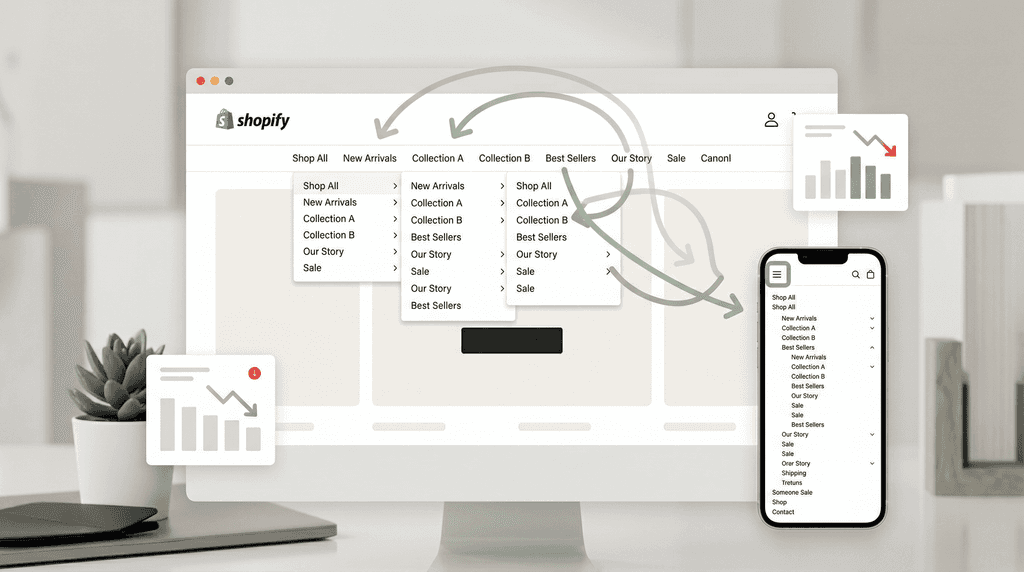
If people can’t quickly find the right category, product, or next step on your Shopify store, conversion suffers. Poor navigation creates friction, makes shoppers feel lost, and increases the chance they leave before buying. Strong ecommerce navigation improves product discovery, reduces abandonment, and helps shoppers move toward purchase faster.
Why this problem happens
A lot of D2C brands focus heavily on branding, ad creative, and product pages, but forget that navigation is what helps shoppers actually move through the store. If the menu is cluttered, categories are vague, or mobile navigation hides important paths, visitors have to work harder to find what they want. That extra effort creates frustration, and frustration kills conversion. Shopify explicitly notes that poor navigation creates friction, while clear navigation improves engagement and conversions.
Navigation problems usually show up when a store grows. What starts as a simple menu turns messy as more products, bundles, categories, and campaigns get added. Suddenly, customers are choosing between confusing labels, dead-end collections, or menus that make sense internally to the brand but not to the shopper. Shopify recommends grouping links logically, flattening menu structure, and aligning navigation with how customers actually browse.
This matters even more on mobile. Mobile users have less screen space, less patience, and less tolerance for bloated menus. Shopify recommends simplifying navigation on mobile to focus on essential, high-intent paths because complicated mobile menus can cost sales.
How to fix it
1. Make your top-level menu instantly clear
Your main menu should help shoppers answer one question fast: “Where do I go next?”
If your top navigation uses clever brand language instead of obvious category names, people hesitate. Use simple, expected labels like Shop, Best Sellers, New Arrivals, Bundles, About, and Contact rather than internal jargon.
Shopify recommends a sensible menu structure with important categories near the top, minimal layers, and familiar conventions. The goal is not to be unique with your navigation — the goal is to be obvious.
2. Group products the way customers shop, not the way your team thinks
Many stores structure navigation around internal operations instead of buying behavior. Customers don’t think in warehouse logic. They think in use cases, product type, benefit, or problem. If your catalog is large, clear parent categories and subcategories matter a lot.
Shopify’s navigation guidance emphasizes clear category taxonomy, while its faceted navigation guidance shows that shoppers need ways to refine large product catalogs by relevant attributes like size, color, price, and other filters. That’s what improves discovery and reduces endless scrolling.
A good real-world example from your own site is the VulgrCo case study. Instead of leaving products as scattered listings, the catalog was organized into clear collections like Custom Stickers, Custom Labels, DTF Transfers, Wall & Floor Decals, and Custom Skateboards. That kind of structure helps a buyer discover related products naturally and supports cross-sell behavior. Flaxen Media
3. Don’t hide high-intent paths
Your best-converting paths should be the easiest to access. If people often buy from Best Sellers, Shop All, Bundles, Sale, or a core category, those links should not be buried. Shopify recommends including important shopper information in the header and using navigation that supports discovery for both decisive buyers and browsers.
For D2C brands, this often means prioritizing:
best sellers
new arrivals
starter bundles
category entry points
sale or offers
support / shipping / returns links
If someone lands from a paid ad, they still need to orient themselves quickly. Your own service page already reflects this principle: when visitors arrive from ads, the website has seconds to build trust and guide them toward purchase. Navigation is a big part of that guidance. Flaxen Media
4. Make mobile navigation smaller, not smarter
A common mistake is cramming the desktop structure into mobile. That usually creates a bulky menu that feels hard to scan and annoying to use. On mobile, less is more. Shopify recommends simplifying mobile navigation to focus on the essentials and making key paths easy to tap.
A strong mobile menu should:
surface top categories fast
keep popular links close to the top
reduce excessive nesting
make search easy to access
keep CTAs and checkout paths obvious
If your store gets a lot of traffic from Instagram, Meta ads, or TikTok, mobile navigation is even more important because that traffic is often colder and less patient.
5. Support navigation with search, filters, and context
Navigation is not just the main menu. It also includes search, filters, breadcrumbs, collection sorting, and contextual links that help users keep moving. Shopify recommends using search prominently and using contextual navigation to suggest relevant next steps.
For larger catalogs, faceted navigation becomes especially helpful because it lets shoppers narrow results quickly by relevant criteria. This is one of the easiest ways to reduce friction for users who know roughly what they want but need help getting to the right product faster.
Common mistakes to avoid
One common mistake is adding too many top-level links. When everything is important, nothing feels important. A crowded header forces users to think too hard.
Another mistake is using vague labels like Explore, Discover, Essentials, or Signature without enough context. These may sound branded, but they usually reduce clarity.
A third mistake is treating the menu as a one-time setup. Navigation should evolve as your product mix, sales data, and customer behavior change. Shopify recommends reviewing how users actually move through the site and where they drop off, then adjusting the structure accordingly.
And finally, many brands forget that navigation is tied directly to conversion. Your own positioning on Flaxen already speaks to this: product structure, messaging, and merchandising all play a role in helping visitors trust the site and buy. Navigation is part of that system, not a separate design detail. Flaxen Media
Quick checklist
Use this before publishing or auditing your menu:
Are the top-level menu labels obvious to a first-time shopper?
Can users reach key categories in 1–2 clicks?
Are best sellers, bundles, or high-intent paths easy to find?
Does mobile navigation feel shorter and simpler than desktop?
Are collections grouped around customer shopping behavior?
Do filters help users narrow results quickly?
Is search visible and easy to use?
Are shipping, returns, and trust-building pages easy to access?
Are there any dead-end collection pages or confusing labels?
Can a new visitor understand the store structure in under 10 seconds?
FAQs
Does navigation really affect conversion?
Yes. Clear navigation helps people find products faster, reduces frustration, and improves product discovery. Poor navigation increases friction and can lead to abandonment.
How many menu items should a Shopify store have?
There is no perfect number, but fewer, clearer top-level choices usually work better than crowded menus. Focus on the highest-intent paths and avoid overloading the header.
What is the biggest navigation mistake D2C brands make?
Usually it’s one of two things: using brand language instead of customer language, or creating too many categories without a clear hierarchy.
Should I use filters on collection pages?
If you have a larger catalog, yes. Shopify explains that faceted navigation helps users refine products by attributes like size, color, price, and more, which improves discovery and reduces effort.
How do I know if navigation is a problem on my store?
Look for signs like high bounce rates on collection pages, low product discovery, poor mobile conversion, frequent exits after landing, and users relying too heavily on search to compensate for weak menu structure.
Closing takeaway
If your Shopify store gets traffic but shoppers struggle to browse, compare, and discover products, navigation may be one of the hidden reasons conversion is low. Good navigation doesn’t just help users move around the site — it helps them feel oriented, confident, and ready to buy. For D2C brands, that can mean the difference between a store that looks good and a store that actually sells. Flaxen Media
If people can’t quickly find the right category, product, or next step on your Shopify store, conversion suffers. Poor navigation creates friction, makes shoppers feel lost, and increases the chance they leave before buying. Strong ecommerce navigation improves product discovery, reduces abandonment, and helps shoppers move toward purchase faster.
Why this problem happens
A lot of D2C brands focus heavily on branding, ad creative, and product pages, but forget that navigation is what helps shoppers actually move through the store. If the menu is cluttered, categories are vague, or mobile navigation hides important paths, visitors have to work harder to find what they want. That extra effort creates frustration, and frustration kills conversion. Shopify explicitly notes that poor navigation creates friction, while clear navigation improves engagement and conversions.
Navigation problems usually show up when a store grows. What starts as a simple menu turns messy as more products, bundles, categories, and campaigns get added. Suddenly, customers are choosing between confusing labels, dead-end collections, or menus that make sense internally to the brand but not to the shopper. Shopify recommends grouping links logically, flattening menu structure, and aligning navigation with how customers actually browse.
This matters even more on mobile. Mobile users have less screen space, less patience, and less tolerance for bloated menus. Shopify recommends simplifying navigation on mobile to focus on essential, high-intent paths because complicated mobile menus can cost sales.
How to fix it
1. Make your top-level menu instantly clear
Your main menu should help shoppers answer one question fast: “Where do I go next?”
If your top navigation uses clever brand language instead of obvious category names, people hesitate. Use simple, expected labels like Shop, Best Sellers, New Arrivals, Bundles, About, and Contact rather than internal jargon.
Shopify recommends a sensible menu structure with important categories near the top, minimal layers, and familiar conventions. The goal is not to be unique with your navigation — the goal is to be obvious.
2. Group products the way customers shop, not the way your team thinks
Many stores structure navigation around internal operations instead of buying behavior. Customers don’t think in warehouse logic. They think in use cases, product type, benefit, or problem. If your catalog is large, clear parent categories and subcategories matter a lot.
Shopify’s navigation guidance emphasizes clear category taxonomy, while its faceted navigation guidance shows that shoppers need ways to refine large product catalogs by relevant attributes like size, color, price, and other filters. That’s what improves discovery and reduces endless scrolling.
A good real-world example from your own site is the VulgrCo case study. Instead of leaving products as scattered listings, the catalog was organized into clear collections like Custom Stickers, Custom Labels, DTF Transfers, Wall & Floor Decals, and Custom Skateboards. That kind of structure helps a buyer discover related products naturally and supports cross-sell behavior. Flaxen Media
3. Don’t hide high-intent paths
Your best-converting paths should be the easiest to access. If people often buy from Best Sellers, Shop All, Bundles, Sale, or a core category, those links should not be buried. Shopify recommends including important shopper information in the header and using navigation that supports discovery for both decisive buyers and browsers.
For D2C brands, this often means prioritizing:
best sellers
new arrivals
starter bundles
category entry points
sale or offers
support / shipping / returns links
If someone lands from a paid ad, they still need to orient themselves quickly. Your own service page already reflects this principle: when visitors arrive from ads, the website has seconds to build trust and guide them toward purchase. Navigation is a big part of that guidance. Flaxen Media
4. Make mobile navigation smaller, not smarter
A common mistake is cramming the desktop structure into mobile. That usually creates a bulky menu that feels hard to scan and annoying to use. On mobile, less is more. Shopify recommends simplifying mobile navigation to focus on the essentials and making key paths easy to tap.
A strong mobile menu should:
surface top categories fast
keep popular links close to the top
reduce excessive nesting
make search easy to access
keep CTAs and checkout paths obvious
If your store gets a lot of traffic from Instagram, Meta ads, or TikTok, mobile navigation is even more important because that traffic is often colder and less patient.
5. Support navigation with search, filters, and context
Navigation is not just the main menu. It also includes search, filters, breadcrumbs, collection sorting, and contextual links that help users keep moving. Shopify recommends using search prominently and using contextual navigation to suggest relevant next steps.
For larger catalogs, faceted navigation becomes especially helpful because it lets shoppers narrow results quickly by relevant criteria. This is one of the easiest ways to reduce friction for users who know roughly what they want but need help getting to the right product faster.
Common mistakes to avoid
One common mistake is adding too many top-level links. When everything is important, nothing feels important. A crowded header forces users to think too hard.
Another mistake is using vague labels like Explore, Discover, Essentials, or Signature without enough context. These may sound branded, but they usually reduce clarity.
A third mistake is treating the menu as a one-time setup. Navigation should evolve as your product mix, sales data, and customer behavior change. Shopify recommends reviewing how users actually move through the site and where they drop off, then adjusting the structure accordingly.
And finally, many brands forget that navigation is tied directly to conversion. Your own positioning on Flaxen already speaks to this: product structure, messaging, and merchandising all play a role in helping visitors trust the site and buy. Navigation is part of that system, not a separate design detail. Flaxen Media
Quick checklist
Use this before publishing or auditing your menu:
Are the top-level menu labels obvious to a first-time shopper?
Can users reach key categories in 1–2 clicks?
Are best sellers, bundles, or high-intent paths easy to find?
Does mobile navigation feel shorter and simpler than desktop?
Are collections grouped around customer shopping behavior?
Do filters help users narrow results quickly?
Is search visible and easy to use?
Are shipping, returns, and trust-building pages easy to access?
Are there any dead-end collection pages or confusing labels?
Can a new visitor understand the store structure in under 10 seconds?
FAQs
Does navigation really affect conversion?
Yes. Clear navigation helps people find products faster, reduces frustration, and improves product discovery. Poor navigation increases friction and can lead to abandonment.
How many menu items should a Shopify store have?
There is no perfect number, but fewer, clearer top-level choices usually work better than crowded menus. Focus on the highest-intent paths and avoid overloading the header.
What is the biggest navigation mistake D2C brands make?
Usually it’s one of two things: using brand language instead of customer language, or creating too many categories without a clear hierarchy.
Should I use filters on collection pages?
If you have a larger catalog, yes. Shopify explains that faceted navigation helps users refine products by attributes like size, color, price, and more, which improves discovery and reduces effort.
How do I know if navigation is a problem on my store?
Look for signs like high bounce rates on collection pages, low product discovery, poor mobile conversion, frequent exits after landing, and users relying too heavily on search to compensate for weak menu structure.
Closing takeaway
If your Shopify store gets traffic but shoppers struggle to browse, compare, and discover products, navigation may be one of the hidden reasons conversion is low. Good navigation doesn’t just help users move around the site — it helps them feel oriented, confident, and ready to buy. For D2C brands, that can mean the difference between a store that looks good and a store that actually sells. Flaxen Media
Other Blogs
Other Blogs
Check our other project Blogs with useful insight and information for your businesses

Other Blogs
Other Blogs
Check our other project Blogs with useful insight and information for your businesses